
Give your Dream League Soccer team a more authentic football look with the Everton kit, available as a free download for DLS players. This custom uniform is designed with high-quality graphics, PNG format, and a 512×512 resolution that makes it compatible with the game’s kit import system.
Adding the Everton Dream League Soccer kit is a simple way to update your squad without creating a design from scratch. Just copy the kit URL, paste it into the import option, and apply the new uniform to your team.


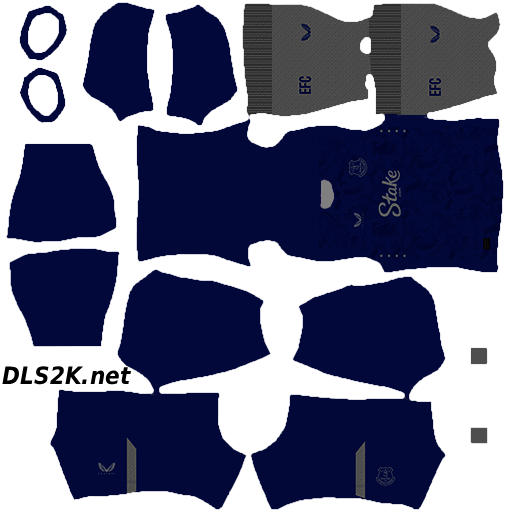


Everton Dream League Soccer Kit Features
The Everton DLS kit is created to match the club’s recognizable style while maintaining the quality needed for Dream League Soccer. The design uses a clean format that helps the uniform look sharp during matches and in the customization menu.
Main features include:
- 512×512 PNG kit format
- High-resolution graphics
- Everton-inspired colors and design
- Team crest and logo details
- Home kit
- Away kit when available
- Third kit when available
- Goalkeeper kit when available
- Compatible with recent Dream League Soccer versions
- Easy kit URL installation
- Free download
A properly sized DLS 512×512 kit helps maintain image quality when displayed on different devices. The PNG format is also useful because it keeps the design clean and ready for direct import into the game.
For players who like customizing every detail of their squad, having the Everton logo or crest included in the uniform design helps create a more realistic team experience.
Everton Home, Away and Goalkeeper Kits
Using different Everton uniforms gives your Dream League Soccer team more variety. The home kit provides the traditional club-inspired appearance, while an away or third kit can be used when you want a different style during matches.
The goalkeeper kit adds another level of detail and helps complete the full team setup. Instead of using a single uniform for every situation, having multiple designs allows you to create a more professional-looking squad.
An updated Everton kit is also a simple way to refresh your team. Whether you are rebuilding a club, creating a realistic career squad, or simply want a new DLS uniform, importing a custom football kit can improve the overall experience.
How to Import the Kit into Dream League Soccer
Installing the Everton kit in Dream League Soccer is a quick process. The exact menu names may vary slightly depending on the version you use, but the general steps are:
- Open Dream League Soccer.
- Go to My Club.
- Select Customize Team.
- Choose Edit Kit.
- Select the option to download or import a kit.
- Copy and paste the Everton kit URL.
- Confirm the import and save the uniform.
After completing the process, check the kit preview to make sure the design has loaded correctly. If you have separate URLs for the home, away, third, or goalkeeper kits, repeat the same steps for each one.
Why Download This Dream League Soccer Kit?
A custom Everton DLS kit is a practical way to make your team look closer to a real football club. Instead of relying on standard in-game uniforms, you can customize your squad with a design inspired by Everton’s identity.
Some advantages of using this kit include:
- More realistic team appearance
- Better immersion while playing
- High-quality graphics
- Sharp image quality on HD screens
- Clean PNG format
- Fast and simple installation
- Easy copy-and-paste setup
- Free access
- No manual editing required
The combination of a 512×512 resolution and a properly prepared PNG image makes the kit suitable for players who want a reliable and compatible uniform for Dream League Soccer.
Download the Everton kit and customize your Dream League Soccer team with a clean, club-inspired football uniform. Explore more DLS kits, logos, and custom uniforms available on the website to continue improving your squad’s appearance.